How to Position Surround Speakers for the Best Sound
Recommended picks


Understanding Speaker Angles
Dolby and DTS both publish reference layouts, and both agree on 90 to 110 degrees for side surrounds in a 5.1 system. That range places the speakers roughly in line with, or just behind, the primary listener. Going too far forward, say 60 to 70 degrees, collapses the side image and makes effects sound like they come from in front of you. Going too far back, past 130 degrees, creates a rear-heavy sound where movement across the front feels disconnected. If you have a single main seat, 90 to 100 degrees is a solid starting point. If you are trying to cover two or three rows, pull the speakers back toward 110 to 120 degrees so everyone gets a more similar experience.
Height: How High to Mount Surround Speakers
The widely cited target is 2 to 3 feet above seated ear level, which works out to roughly 6 to 7 feet from the floor for most adults seated in a standard chair or sofa. Below that range the speaker output hits you at ear level and creates a localizable point source, which is the opposite of what surrounds are supposed to do. Much higher than 8 feet and the sound can feel disconnected from the action on screen, especially for dialogue-heavy scenes where the mix relies on height cues. Wall-mount brackets with tilt adjustment make it easy to angle the drivers down toward the listening position once you have the speaker at the right height. The Acoustic Audio by Goldwood PSC-43 ($42.88, 4.2 stars across 360 reviews) is a compact shelf-mount bookshelf and center-channel speaker light enough at 6 lb to use on an angled bracket without stressing drywall anchors.
Distance and Time Alignment
Most AV receivers include an automatic setup microphone system, but you still need to give the receiver accurate measurements to work from. Measure the straight-line distance from each surround speaker to the center of your primary listening seat and enter those values in the receiver's speaker setup menu. A difference of even 2 feet between the left surround and right surround distances creates enough delay to shift perceived center and throw off panning effects. If your room forces an asymmetric layout, use the receiver's individual channel delay settings to compensate. The Klipsch R-52C ($149.99, 4.8 stars across 3,000 reviews) is a popular surround choice that pairs cleanly with most receiver auto-EQ systems thanks to its sensitivity, which means the receiver does not need to push as much power to match it to the fronts.
7.1 and Atmos: Adding More Channels
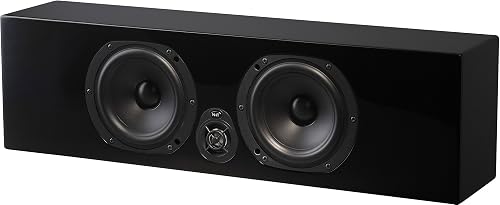
A 7.1 layout adds two back surround speakers behind the listening position, placed at 135 to 150 degrees from the front center. These are not the same as the side surrounds: their job is to extend the rear field rather than create side ambience, so they should be closer to the back wall and can be mounted at the same height as the side surrounds. Dolby Atmos height speakers, whether up-firing or in-ceiling, sit at 45 degrees above the front and rear channel positions. Up-firing Atmos modules work best in rooms with flat, hard ceilings at 8 to 10 feet; vaulted or acoustically treated ceilings scatter the bounce and reduce the effect. The NHT MS Center ($374.94, listed as surround type with a 5.25-inch driver at 16.25 lb) is built with tabletop mounting in mind, which suits back-surround placement on a shelf or media credenza behind the main seating row.
Small Rooms and Apartment Setups
Tight rooms below roughly 12 by 14 feet present a real challenge because the listener ends up too close to the surrounds. The fix is to angle them more aggressively toward the front, pointing them past the listening position so the direct sound arrives slightly delayed relative to the reflections. Dipole or bipole surround speakers were designed for exactly this situation because they radiate sound in two directions and produce a more diffuse field in close quarters. If you are using direct-radiating bookshelf speakers in a small room, try pulling them forward of the 90-degree mark, to around 70 to 80 degrees, and angling them toward the opposite wall rather than directly at the seat. Keeping the volume level of the surrounds 3 to 6 dB below the front channels also softens the aggressive close-field effect.
Common Mounting Options and Cable Management
Wall-mount brackets with pivot and tilt are the most flexible solution and keep the floor clear. Ceiling mounts work well for in-ceiling speakers but require fishing wire through the ceiling, which is easier in unfinished basements or rooms directly below an attic. Stands are the simplest choice for renters or anyone who does not want to patch holes later: a 28- to 36-inch stand puts most speakers in the right height zone. Whatever method you choose, use banana plugs or spade connectors at the speaker terminals to make future adjustments easier without re-stripping wire. Run speaker wire along baseboards or through in-wall conduit rather than across the floor, where it becomes a tripping hazard and gets damaged by foot traffic.
Common mistakes to avoid
- Placing surrounds at ear level directly to the side, which makes them sound like obvious point sources instead of ambient surround fields.
- Mounting at wildly different distances from the listening seat without adjusting receiver delay to compensate, causing panning effects to feel lopsided.
- Using the same EQ and volume level for surrounds as the front channels without calibrating first, which makes surround effects overpowering or inaudible.
- Pointing both surround speakers directly at the primary seat, especially in small rooms, rather than angling them to disperse reflections.
- Skipping the receiver's auto-calibration run after moving speakers, so old distance and level data from the previous position remains active.
- Routing speaker wire across walkways or under rugs where it gets pinched, which degrades signal quality and creates a fire risk over time.
Frequently asked questions
How far from the wall should surround speakers be?
A gap of 6 to 12 inches from the back wall is enough to reduce bass buildup from boundary reinforcement. If the speaker is rear-ported, a larger gap of 12 to 18 inches gives the port room to breathe and prevents a boomy, one-note bass response. Sealed or front-ported designs are more tolerant of tight placement near walls.
Can I use bookshelf speakers as surround speakers?
Yes. Most home theater setups use bookshelf speakers for surrounds because they are compact and easy to wall-mount or place on stands. Matching the brand and driver size of your surrounds to your front speakers is worth doing when possible because it keeps the tonal character consistent as sounds pan across the room. A compact bookshelf like the Acoustic Audio PSC-43 at $42.88 and 4.2 stars is a reasonable budget option for surrounds in a small to mid-size room.
Do surround speakers need to match my front speakers?
Matching brands and product lines is the conventional recommendation because manufacturers voice their drivers to have the same tonal balance across a lineup. That said, a close tonal match from a different brand often works fine once the receiver's auto-EQ runs and corrects any frequency-response differences. The bigger issue is sensitivity: if your surrounds are 5 to 6 dB less sensitive than your fronts, the receiver has to push noticeably more power to them to hit the same volume, which can push a lower-powered receiver toward distortion.
What degree angle should surround speakers be at?
The ITU and Dolby reference standards call for 90 to 110 degrees from the front center for side surrounds in a 5.1 system. Back surrounds in a 7.1 setup go at 135 to 150 degrees. Use the lower end of each range if you have a single listening seat and want the tightest imaging, and the higher end if you need to cover multiple seats in a wider room.
Should surround speakers be louder or quieter than front speakers?
Surrounds are typically calibrated 3 dB lower than the front left and right channels in a reference home theater mix. Most receivers set this automatically during calibration. Raising the surrounds too high makes ambient effects feel distracting and movie dialogue seem to bleed backward, while setting them too low kills the immersive effect the mixing engineer intended.