5.1 vs 7.1 Surround Sound: Which Setup Is Right for You?
Recommended picks


What the Numbers Actually Mean
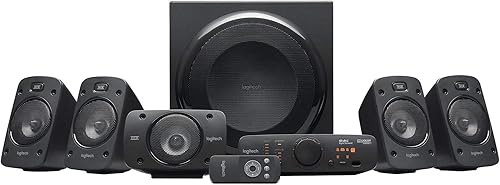
In a surround sound channel designation, the first number is the count of full-range speakers and the second is the subwoofer count. A 5.1 system has five speakers: front-left, center, front-right, surround-left, and surround-right, plus one subwoofer. A 7.1 system adds a rear-surround-left and rear-surround-right behind the main listening seat, bringing the total to seven full-range speakers. Both formats share the same .1 subwoofer, so bass reproduction is identical between them when the sub is the same unit. The difference is purely in how far around the room the sound wraps.
Room Size: The Most Important Factor
Acoustics determine whether the extra two channels in a 7.1 setup help or hurt. Rear surround speakers need at least six to eight feet of distance behind the listening position to sound distinct from the side surrounds. In a room shallower than about 14 to 15 feet, those rear speakers fire at the backs of your head from too close, creating a muddy, congested surround image rather than a natural one. Larger dedicated home theater rooms, dedicated media rooms with seating rows, or open-plan spaces with long depth dimensions benefit most from 7.1. Living rooms under 200 square feet almost always sound better with a clean 5.1 placement.
Receiver Compatibility
Before buying an eight-speaker package, confirm your AV receiver has seven amplified channels. Many entry-level receivers are rated 5.1 or 5.2 and lack the amplifier stages for rear surrounds. Adding a 7.1 speaker package to a 5.1 receiver means two of those speakers will never get signal. Check the spec sheet for the number of amplified channels, not just the supported decoding formats. Brands like Denon, Yamaha, and Marantz typically reach 7.2 amplified channels starting in the $400 to $600 receiver range. If your receiver only supports 5.1, a great 5.1 speaker system is the smarter buy today.
Content Availability
Most streaming content and Blu-ray releases carry a 5.1 audio track as the standard. True discrete 7.1 soundtracks exist on some Blu-rays and a smaller share of streaming titles, but they are not the majority. When a 7.1 receiver plays a 5.1 source, it uses a matrix process called Dolby Pro Logic IIx or DTS Neo:X to synthesize rear surround signals from the existing 5.1 mix. The result is plausible but not the same as a real discrete 7.1 mix. If most of your library is 5.1 content, the real-world difference you hear in everyday use is smaller than the channel count suggests.
Real Products Across Both Formats
The Logitech 980-000467 is a popular 5.1 system rated 4.5 stars across 5,900 reviews at around $403, with 1,000 watts of system power and aux connectivity, making it a straightforward entry point for smaller rooms. For buyers who want a 7.1 format at a lower price, the Ultimea U2601 is a 7.1 system at $150, rated 4.2 stars across 1,100 reviews, with 330 watts and HDMI, Bluetooth, and optical inputs. Buyers prioritizing speaker quality over channel count often look at the Klipsch 1065826, a 5.1 system at $834 rated 4.8 stars from 301 reviews, with wired connectivity and 75 watts of clean amplification. Klipsch horn-loaded tweeters deliver efficiency that makes lower wattage sound louder and more dynamic than comparable wattage figures from other brands.
When to Upgrade from 5.1 to 7.1
The right time to move to 7.1 is when you already have a well-tuned 5.1 system and a room large enough to justify it. Buying 7.1 upfront in a small room is a common mistake that wastes money on two speakers that will either sit unused or create acoustic problems. If you plan to build a dedicated theater room, lay the wire for rear surrounds during construction even if you start with a 5.1 configuration, so adding those two channels later requires no pulling wire through finished walls. Most AV receivers and processors also include auto-calibration tools like Audyssey or YPAO that will measure your room and adjust delay and level for all seven channels, which matters more for 7.1 accuracy than brand or price.
Common mistakes to avoid
- Buying a 7.1 speaker package for a room under 14 feet deep, where rear surrounds are too close to the listening seat to sound natural.
- Pairing a 7.1 speaker package with a 5.1 receiver that has no amplifier outputs for the rear surround channels.
- Judging a system by total watt claims rather than channel count, speaker sensitivity, and room size compatibility.
- Placing surround speakers directly to the left and right of the listening position instead of slightly behind and above ear level, which collapses the soundstage.
- Skipping receiver auto-calibration after placing speakers, which leaves channel levels and delay times incorrect for your room.
- Assuming 7.1 always sounds better than 5.1 regardless of room or content, when most streaming and broadcast audio is a 5.1 or stereo mix.
Frequently asked questions
Does 7.1 surround sound require special cables or wiring?
No special cable type is required. The two extra rear surround channels use the same standard speaker wire as the rest of the system. The only wiring difference is running those two additional wire runs from your receiver to the rear surround speaker locations, which can require routing wire along baseboards or through walls in a finished room.
Can I run a 7.1 speaker setup with a 5.1 receiver?
Not effectively. A 5.1 receiver has five amplified speaker outputs, so the two rear surround channels in a 7.1 package would have nowhere to connect. You can still use five of the eight speakers, but you would be paying for speakers you cannot use. Match your speaker count to your receiver's amplified channel output.
Is 5.1 good enough for Dolby Atmos content?
Dolby Atmos uses height channels, which are separate from the 5.1 or 7.1 horizontal surround layout. A 5.1 system plays the bed layer of an Atmos mix but does not reproduce the overhead effects. To get height channels you need Atmos-enabled speakers or ceiling speakers and a receiver that decodes Atmos, which is a different upgrade path than going from 5.1 to 7.1.
How much space do I need for rear surround speakers in a 7.1 setup?
Industry guidance from Dolby and DTS places rear surrounds two to three feet behind the main listening position and angled inward toward each other. That means your room needs seating that sits far enough from the back wall to allow speakers behind you without firing directly at the backs of heads from inches away. A room depth of at least 14 to 16 feet gives the surrounds enough distance to blend correctly.
What should I spend on a 5.1 system vs a 7.1 system for the same budget?
For the same budget, a better-quality 5.1 system almost always outperforms a budget 7.1 system. Speaker driver quality, crossover design, and enclosure construction affect sound quality more than adding two extra lower-quality drivers. If your budget is under $500, put the full amount into a quality 5.1 package. Consider 7.1 only when you can afford at least matching quality for all seven channels without cutting corners on the front three speakers, which carry the majority of dialog and on-screen action.