Do I Need 8K HDMI on My AV Receiver?
Recommended picks


What 8K HDMI Actually Means on a Receiver
When manufacturers advertise '8K HDMI,' they mean HDMI 2.1 ports rated to carry an uncompressed 8K/60Hz or 4K/120Hz signal at 48 Gbps bandwidth. That is distinct from ordinary HDMI 2.0, which tops out at 18 Gbps and handles 4K/60Hz without HDR10+ or Dolby Vision at full bandwidth. The Yamaha RX-A4ABL, for instance, ships with 10 HDMI ports and HDMI 2.1 support across its inputs, which is one reason it sells at $1,099. The extra bandwidth is also what enables 4K/120Hz gaming, so the label carries meaning beyond 8K video alone.
The State of 8K Content Right Now
As of mid-2024, there is no commercial 8K disc format and no major streaming service delivering native 8K at consumer scale. YouTube hosts some 8K demo clips, but they require enormous bandwidth and even then are upscaled from lower-resolution cameras in most cases. The absence of a genuine 8K content pipeline means a receiver with 8K passthrough has nowhere to receive a true 8K signal in a typical home. Paying a premium for that capability today is similar to buying a Blu-ray player in 2003, years before discs were available.
When 8K HDMI Is Worth Paying For
There are two real reasons to prioritize 8K HDMI support. First, if you already own an 8K TV, you need HDMI 2.1 on your receiver so the signal passes through cleanly rather than being downgraded. Second, if you plan to use a PlayStation 5 or Xbox Series X at 4K/120Hz with VRR and ALLM, those features also run over HDMI 2.1. The Onkyo TX-RZ30 at $999 packs 8 HDMI ports with 2.1 support and 100W per channel, making it a sensible choice for a gaming-plus-home-theater setup that benefits from the full bandwidth. Outside those two scenarios, 8K HDMI is not load-bearing.
What You Lose by Skipping 8K HDMI
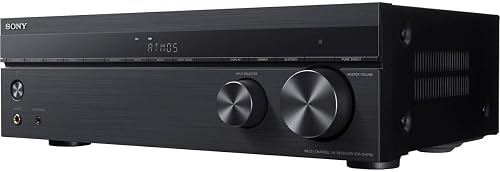
A receiver without HDMI 2.1 will still pass 4K HDR signals and support Dolby Atmos and DTS:X audio, which are the features that matter most for daily movie and TV watching. You give up 4K/120Hz gaming and 8K passthrough, and you may see reduced support for VRR and ALLM depending on the specific model. If your television is a current 4K set and your game console is played at 60Hz or you don't game at all on the big screen, none of that is a real-world loss. The Sony STR-DH790, rated 4.3 stars across 3,000 reviews, remains a popular choice precisely because it covers everyday 4K home theater without the extra outlay.
Port Count Matters as Much as Port Version
A common oversight is focusing on HDMI version while ignoring port quantity. A receiver with four HDMI 2.1 inputs sounds impressive until you run a 4K Blu-ray player, a streaming stick, a cable box, and a game console simultaneously and run out of slots. Aim for at least six HDMI inputs if you have multiple sources, and verify how many support the full 48 Gbps bandwidth rather than just the marketing headline. Some models list HDMI 2.1 on select ports only. The Marantz CINEMA50SG at $2,800 offers 9 HDMI ports, while the Yamaha RX-A4ABL reaches 10, both giving real-world headroom for complex setups.
How to Decide for Your Setup
Start with your TV. If it is a 4K set, any modern receiver with HDMI 2.0 at 4K/60Hz will not be the bottleneck. If it is an 8K TV or you are buying one within 12 months, look for full HDMI 2.1 across at least two inputs. Next, check your sources. Disc players, most streaming boxes, and cable hardware all top out at 4K today. If you game at 4K/120Hz, confirm HDMI 2.1 on the port your console uses. Budget the premium for 8K HDMI against what it would buy in amplifier power, room correction quality, or speaker count instead. For most buyers, that trade-off does not favor the 8K upgrade.
Common mistakes to avoid
- Buying a receiver with 8K HDMI for a 4K TV, paying $200 to $400 more for a feature that does nothing in that setup.
- Assuming all HDMI 2.1 ports on a receiver are equal. Some models reserve full 48 Gbps bandwidth for only one or two ports.
- Ignoring port count while chasing port version. Running out of HDMI inputs is a more common real-world problem than hitting a bandwidth ceiling.
- Treating 8K HDMI as a future-proofing guarantee. HDMI standards will continue to evolve, so today's 8K receiver may still need replacement before widespread 8K content arrives.
- Confusing 4K/120Hz gaming support with 8K video support. Both use HDMI 2.1, but they are separate use cases with different value for different households.
- Overlooking that eARC, Dolby Atmos, and room correction quality are independent of HDMI version and often matter more for overall sound performance.
Frequently asked questions
Can I use an 8K TV with a receiver that only has HDMI 2.0?
Yes, but the receiver will downscale the signal passing through it to the limits of HDMI 2.0, which means 4K/60Hz at most. Your 8K TV will still upscale that to fill its panel, so the picture will look fine for most content today. The limitation only matters if you have a true 8K source, which essentially does not exist in consumer form yet.
Does HDMI 2.1 improve audio quality or only video?
HDMI 2.1 does not change the audio formats a receiver supports. Dolby Atmos and DTS:X pass through HDMI 2.0 ports without issue. The 2.1 upgrade is about video bandwidth and gaming features such as VRR, ALLM, and 4K/120Hz. Audio quality comes from the receiver's DAC, amplifier section, and room correction software, none of which are tied to HDMI version.
Is 4K/120Hz gaming the same as needing 8K HDMI?
They share the same physical cable standard, HDMI 2.1, but they are different use cases. 4K/120Hz gaming is a real and widely available feature on current PlayStation 5 and Xbox Series X consoles. 8K video passthrough requires an 8K source and an 8K display. If you want 4K/120Hz gaming through your receiver, you need HDMI 2.1 ports, but that is not the same as chasing 8K video capability.
Will a receiver with HDMI 2.0 ports become obsolete soon?
Not in the short term. The AV receiver market still sells millions of units with HDMI 2.0 and the installed base of 4K TVs dwarfs 8K by a wide margin. A well-featured HDMI 2.0 receiver bought today will handle current sources and formats for several years. That said, if you plan to keep the receiver for a decade and expect to adopt 8K, factoring in HDMI 2.1 now is reasonable.
How do I check which HDMI ports on a receiver are full 48 Gbps?
Look in the detailed specifications section of the manufacturer's product page, not the feature bullet list on retail sites. Manufacturers typically list port-by-port bandwidth in a table. For example, some receivers label two inputs as '8K/60Hz' and the remaining ports as '4K/60Hz.' Always verify port-level specs before purchase if 4K/120Hz or 8K passthrough is a requirement. Contact hello@hometheaterbuilder.com if you need help comparing specific models.