What Do AV Receiver Channels Mean? A Plain-English Guide
Recommended picks


Breaking Down the Numbers: What Each Position Means
Every AV receiver channel spec follows the same pattern: speakers first, subwoofers second, and sometimes a third number for overhead height channels. In a 5.1 setup the five channels are front left, center, front right, surround left, and surround right. The .1 refers to one low-frequency effects channel, which is what powers your subwoofer. A 7.1 adds two more surround-back speakers behind the listening position. When you see a third number, such as 7.1.4, those four additional channels power ceiling or upward-firing Dolby Atmos speakers.
Common Channel Configurations and What They Sound Like
A 2.0 or 2.1 receiver is stereo with an optional subwoofer and works fine for music or a small TV setup with no surround ambition. Step up to 5.1 and you get convincing left-right envelopment that suits most living rooms up to about 15 by 20 feet. A 7.1 layout fills larger rooms and adds rear-surround information that genuinely improves action films and concert videos. Anything labeled 7.2.4 or beyond targets dedicated home theater rooms where Atmos height channels make overhead effects, like rain or a helicopter, feel physically above you rather than just louder.
How Receiver Channels Map to Speaker Placement
The center channel handles the majority of dialogue in a film, so it must sit directly above or below your screen for voice to lock to the picture. Front left and right deliver music, score, and screen-edge effects, and they should be at ear height angled toward the main seat. Surround channels work best placed slightly above ear height to the sides or just behind the listening row. If your receiver supports a .2 subwoofer configuration you can place one sub in the front corner and a second in the rear corner, which evens out bass across different seats rather than leaving a hot spot.
Choosing the Right Channel Count for Your Room and Budget
For apartments or bedrooms a 5.1 receiver is the practical ceiling because surround speakers in a small space can sound too close and washy. A medium living room rewards a 7.1 or 7.2 layout, especially if your streaming service of choice carries Dolby Atmos or DTS:X content. The Onkyo TX-SR494 (637 reviews, 4.3 stars, $499.95) supports up to 160 watts per channel across its outputs and includes 4 HDMI ports with Bluetooth for wireless device streaming. The Yamaha RX-A4ABL (258 reviews, 4.4 stars, $1,099) steps up to 10 HDMI ports and 110 watts per channel with built-in Wi-Fi and Bluetooth, making it a strong fit for a room built around Atmos. Match the channel count to the speakers you can realistically place, not the maximum the receiver supports.
Amplifier Channels vs. Pre-Out Channels
Some receivers list more channels in the spec than they can amplify internally. The extra channels are available as pre-outs, meaning the receiver decodes and processes the signal but sends it to an external power amplifier rather than powering the speaker directly. This matters when you want more than seven or nine powered zones without buying a separate model. If you only have passive speakers and no external amp, count only the built-in amplified channels when sizing your purchase. Pre-outs are a useful upgrade path, not a replacement for the internal amp count.
What About Zone 2 and Multi-Room Channels?
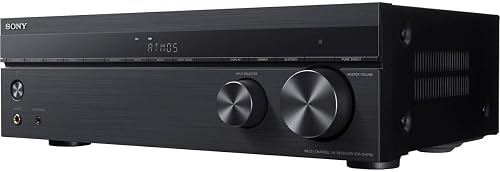
Many mid-range and higher receivers let you redirect two of their amplified channels to a second room, called Zone 2. When Zone 2 is active those channels are borrowed from the main surround or surround-back positions, so a 7.1 receiver effectively becomes 5.1 in the main room while music plays in the kitchen or patio. Some models add a dedicated Zone 2 amplifier so the main room keeps all its channels. The Sony STR-DH790 (3,000 reviews, 4.3 stars) is a well-reviewed option that buyers consistently praise for its multi-zone flexibility at its price point. Read the spec sheet carefully because the total channel count advertised often includes Zone 2, which can be misleading if you want full surround and a second room simultaneously.
Common mistakes to avoid
- Buying a 7.1 or 9.2 receiver without having a room large enough to place surround and rear speakers at the minimum recommended distances, which causes the surround channels to sound harsh rather than enveloping.
- Confusing the number of HDMI inputs with the number of channels. HDMI ports are video and audio connections to source devices and have nothing to do with how many speakers the receiver can power.
- Assuming a higher channel count always means better sound. A 5.1 receiver with a clean amplifier section and proper room setup will beat a 9.2 receiver with cheap output stages and no acoustic treatment.
- Ignoring the subwoofer output count. A single .1 sub channel is fine for most rooms, but a .2 output lets you run dual subwoofers for more even bass distribution, which is especially useful in rectangular rooms prone to bass nulls.
- Planning a 7.1 layout and then discovering the receiver only amplifies 5 channels internally, with the remaining two available only as pre-outs requiring a separate amp you did not budget for.
- Treating the watt-per-channel rating as the main buying criterion without considering channel count. A receiver rated at 100 watts across 5 channels powers a room very differently from one that splits the same internal capacity across 9 channels.
Frequently asked questions
Is a 5.1 or 7.1 receiver better for most living rooms?
For rooms under roughly 200 square feet, 5.1 is usually the better fit. A 7.1 layout adds two rear-surround speakers that need several feet of distance behind the main seating position to sound natural. If your couch sits close to a wall, those rear channels can create an unpleasant close-mic effect rather than genuine envelopment.
Can I buy a 7.1 receiver and just use 5 speakers now, then add more later?
Yes, all AV receivers let you configure only the speaker positions you have installed. You would set up the receiver for 5.1 in the speaker configuration menu, and the unused channels simply stay off. When you add rear-surround or height speakers later you update the configuration and the receiver activates those amplifier sections without any other changes needed.
Does a 9.2 receiver actually use two separate subwoofer amplifiers?
Not always. Many receivers with a .2 designation send the same mono bass signal out of both subwoofer jacks rather than truly independent signals. This still benefits you because you can run two subwoofers from a single receiver without a splitter cable, which preserves signal quality. Fully independent subwoofer channels with separate level and delay control are a feature of higher-end models, so check the detailed spec sheet if that distinction matters to your setup.
What does a third number, like 7.1.4, mean on a receiver?
The third number counts dedicated height channels for object-based surround formats such as Dolby Atmos and DTS:X. In a 7.1.4 system the four height channels power either in-ceiling speakers or upward-firing Atmos speakers that bounce sound off the ceiling. These height channels create the sensation of audio moving above the listening position, which is the core of the Atmos experience. You need source content mixed in Atmos or DTS:X to hear the difference, so check that your streaming or disc library supports those formats before investing in height speakers.
If a receiver says 9.2-channel processing but only 7 amplifier channels, what does that mean?
The receiver can decode and process a 9.2-channel Atmos or surround signal internally, but it only has seven built-in power amplifiers. The two extra decoded channels are available as line-level pre-outputs on the back panel. To use them for actual speakers you connect an external stereo power amplifier to those pre-outs. This design lets manufacturers offer full Atmos decoding at a lower price while still giving buyers a clear upgrade path if they want to add an amp later.