How to Choose an AV Receiver: A Practical Buyer's Guide
Recommended picks


Start With Channel Count
The channel configuration tells you how many speaker outputs the receiver drives. A 5.1 receiver handles front left, center, front right, two surrounds, and a subwoofer. A 7.1 adds two more surrounds for a wider sound field, and 9.2 or higher designs add overhead channels for Dolby Atmos or DTS:X. If you have a two-channel stereo setup today, a 5.1 receiver gives you room to add speakers later without buying new gear. Most buyers in a mid-size living room land at 5.1 or 7.1, which covers the Dolby and DTS formats on 4K Blu-ray discs and streaming. Match the receiver channel count to the speaker layout you actually have or plan to build, not the largest number on the box.
Power Per Channel: What the Numbers Mean
Receiver power ratings are measured in watts per channel, and they are not all measured the same way. A reliable spec is continuous power into 8 ohms with all channels driven simultaneously. The Onkyo TX-SR494, for example, is rated at 160 watts per channel and carries 637 buyer reviews with a 4.3 rating, which suggests real-world confidence in that spec. For a typical home theater with bookshelf or floor-standing speakers in a room up to 300 square feet, 80 to 120 watts per channel is more than enough. Sensitivity matters too: a speaker rated at 90 dB sensitivity needs roughly half the power to reach a given volume compared to an 87 dB speaker. If your speakers are efficient, you do not need the highest wattage model.
HDMI Ports and Resolution Support
Count every device you plan to connect: Blu-ray player, game console, streaming stick, cable box. That number is your minimum HDMI input count, and one port extra is a good buffer. The Yamaha RX-A4ABL carries 10 HDMI ports and connects via HDMI, Bluetooth, and Wi-Fi, which covers even complex setups without a switcher. Also check whether the receiver passes 4K HDR, Dolby Vision, and HDR10. Most current models do, but budget units from a few years ago often stop at 1080p passthrough. If you have a 4K TV, confirm the spec sheet explicitly says 4K 60Hz passthrough before buying.
Built-In Streaming and Wireless Features
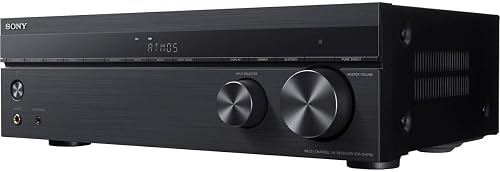
Many receivers now include Wi-Fi, Bluetooth, and multi-room audio built in, which lets you stream from a phone or service like Spotify without running extra cables. The Sony STR-DH790, one of the most reviewed AV receivers on the market with over 3,000 buyer ratings at 4.3 stars, is a good example of a receiver buyers keep coming back to for solid all-around performance. Bluetooth is useful for casual music; Wi-Fi gives you higher-quality wireless audio and app control. If you plan to add more listening zones around the house later, look for a model that supports a multi-room standard so you are not locked out later.
Room Calibration Systems
Most mid-range and higher receivers include an automatic room calibration system. Audyssey, YPAO (Yamaha), and MCACC (Pioneer) all use a supplied microphone to measure your room acoustics and set speaker distances, levels, and EQ automatically. This single feature can do more for sound quality than any other spec on the sheet, especially in rooms with hard floors or odd shapes. Budget receivers skip calibration entirely, which is fine if you are willing to set speaker levels manually. For most buyers, spending a little more to get a receiver with auto-calibration is worth it.
Setting a Realistic Budget
Entry-level receivers in the $300 to $500 range cover 5.1 channels, 4K HDMI, and Bluetooth, and they work well for most living rooms. The $500 to $1,000 range adds more HDMI ports, better calibration systems, higher power, and Wi-Fi. Above $1,000, you gain more channels, pre-amp outputs, and audiophile-grade DAC stages. The sweet spot for most home theater builders is $400 to $700. Spending more makes sense only if you have demanding speakers, a very large room, or a complex multi-source setup that needs the extra inputs and outputs.
Common mistakes to avoid
- Buying more channels than your speaker count requires and never filling them, while still paying for the extra hardware.
- Ignoring speaker impedance. A 4-ohm speaker pulls twice the current of an 8-ohm speaker, and budget receivers can overheat or shut down under that load.
- Assuming watt ratings are comparable across brands. Always check that the spec is measured with all channels driven into 8 ohms, not just two channels.
- Skipping HDMI version checks on older or open-box units. A receiver limited to HDMI 1.4 cannot pass 4K HDR to your TV.
- Buying a receiver without room calibration, then struggling with uneven bass and speaker levels in a treated room for years.
- Choosing a receiver based on peak power claims printed on the front panel instead of the continuous rated power in the spec sheet.
Frequently asked questions
How many watts per channel do I actually need for a home theater?
For a room up to about 300 square feet with standard 8-ohm speakers rated at 88 to 90 dB sensitivity, 80 to 120 watts per channel is sufficient. Larger rooms or low-sensitivity speakers push that number higher, but most home theaters never need more than 150 watts per channel in practice. Focus on speaker sensitivity and room size more than chasing the highest watt rating you can find.
Does it matter if I buy a 7.1 receiver for a 5.1 speaker setup?
No, a 7.1 receiver works fine with five speakers and a subwoofer. The two extra channels simply go unused until you add more speakers. Buying a 7.1 model can make sense if you plan to expand your speaker layout later, since you avoid buying a new receiver when you add surrounds. Just make sure the extra channels justify any added cost.
What is the difference between Dolby Atmos and standard 5.1 surround?
Standard 5.1 and 7.1 surround places audio on a horizontal plane around the listener. Dolby Atmos adds height channels, usually ceiling speakers or upward-firing speakers on top of floor-standing units, so sound can move overhead. Atmos requires a receiver that decodes the format and at least two additional height speakers. If you plan to add overhead speakers, confirm the receiver explicitly lists Dolby Atmos decoding in its features.
Can I use an AV receiver with a soundbar?
Generally no. A soundbar is a self-contained amplifier and speaker system, and connecting it as a speaker output from a receiver creates an impedance mismatch that can damage both units. If you want a soundbar, connect it directly to your TV and skip the receiver. If you want a receiver, pair it with discrete speakers, not a soundbar.
Should I buy a refurbished or renewed AV receiver to save money?
Renewed units from reputable programs can offer good value, but check the warranty carefully. Manufacturer-certified refurbs typically carry a 90-day to one-year warranty. Avoid third-party renewed units without a clear return policy, since receiver repairs can cost more than the savings. If the original unit had known failure issues, look that model up before buying a renewed version.